How the coach is put together, in three pictures: the whole system, one weekly planning run, and how one run becomes the numbers the coach reads. Select a diagram to open it full size.
Layered structure
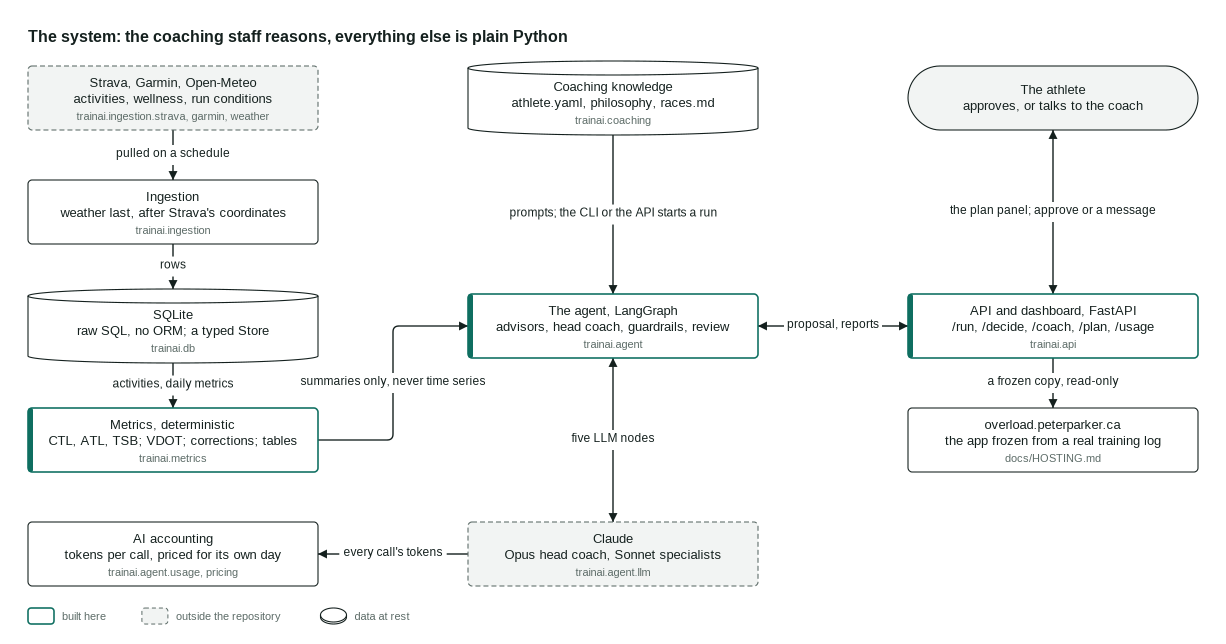
The diagram reads left to right, from raw data to a plan the athlete approves.
First the data comes in: runs from Strava, sleep and recovery from Garmin, and the weather for each run from Open-Meteo. The weather is fetched last, because it needs the run's location from Strava. Everything lands in one local SQLite database.
Then plain, tested code does all the arithmetic, with no AI involved. Each run's pace is corrected for hills, heat, sun and wind, fitness is estimated from it, and the training load is rolled up over time, along with the pace tables and race predictions that follow from fitness.
Only then does the AI coach read anything, and it reads summaries, never raw numbers. Three specialist advisors and a head coach, all on Claude, are prompted with the athlete's profile, the coaching philosophy and the race calendar, and propose the week. Every call is costed at the price on the day it was made. The athlete sees the proposal, the advisors' reports and the chat in the dashboard or on the command line, and either approves the week or talks it through with the coach. The demo at overload.peterparker.ca is the app frozen from a real training log, read-only.
Where it lives: trainai.ingestion, trainai.db, trainai.metrics, trainai.agent, trainai.agent.usage, trainai.coaching and trainai.api.
Data flow for one weekly run
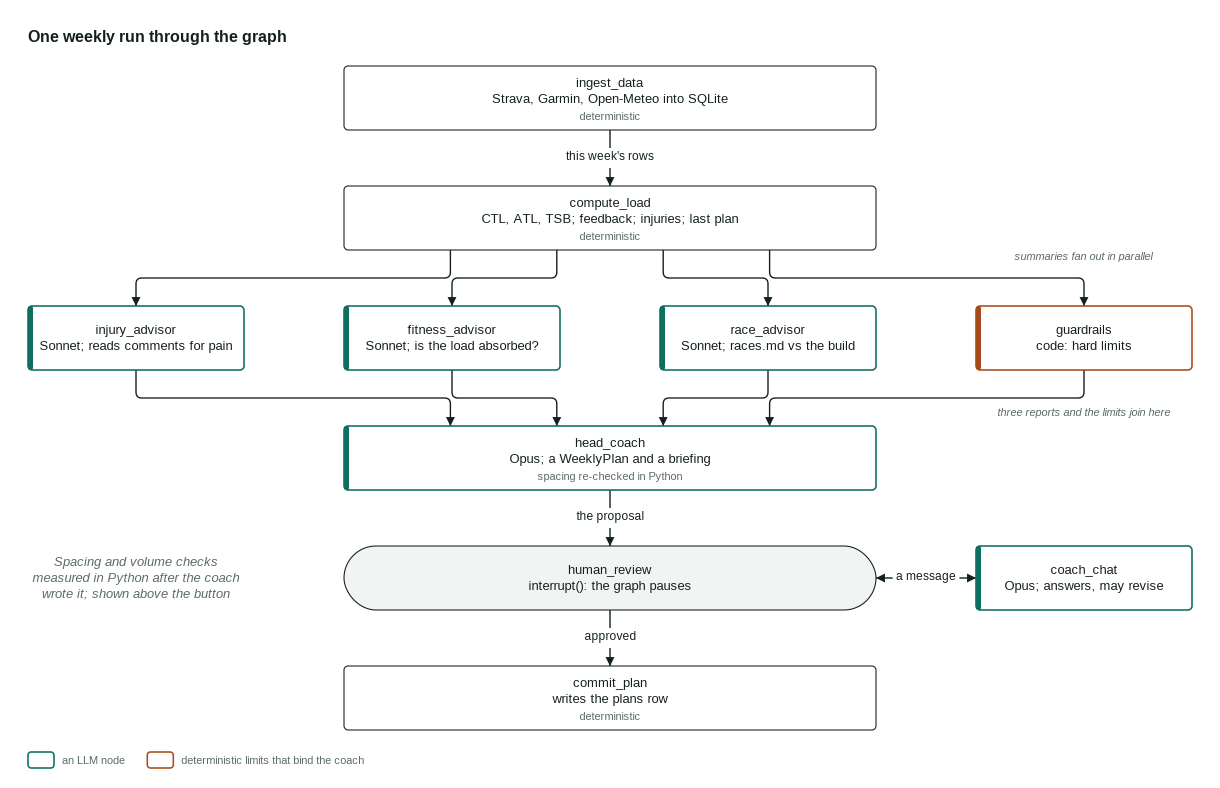
This is what happens each week when the coach plans the next one.
The first two steps are ordinary code: bring in the new data and work out the training load. Then three advisors and the safety rules run side by side. The advisors are AI models, each with its own specialty. The safety rules, such as how much the weekly volume may grow and how hard sessions must be spaced, are plain code that no model can override.
The head coach, a larger model, weighs the three reports and writes the week as a structured plan with a short briefing. After it has written the plan, the spacing and volume rules are checked again in code, and any that fail are shown above the approve button.
Then everything pauses for the athlete. They can approve the plan, or send the coach a message. The coach answers, changes the plan only if there is a reason to, and the plan comes back for review, for as many rounds as the athlete wants. Nothing is saved until the athlete approves.
Where it lives: ingest_data, compute_load, head_coach, human_review, coach_chat and commit_plan in trainai.agent.
The metrics layer, as a figure
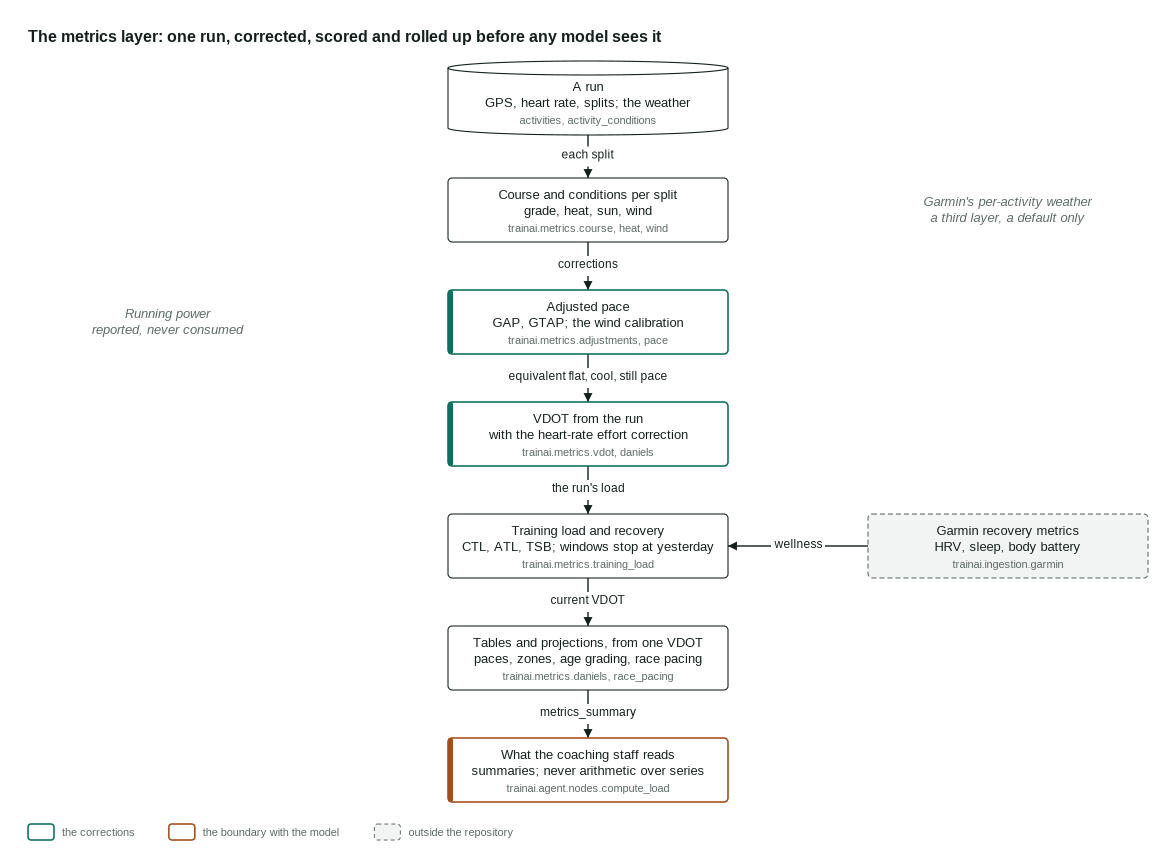
This is how one run becomes the numbers the coach reads.
A run comes in with its GPS track, heart rate, splits and the weather that morning. Each split is corrected for hills, heat, sun and wind, so a slow kilometre up a hill on a hot day counts for what it was. Garmin's own weather for the run is used only when nothing better is available.
From the corrected pace, the run's fitness score, VDOT, is read, adjusted for how hard the heart was working, so an easy run is not mistaken for a flat-out one. Training load and recovery are then rolled up together with Garmin's sleep and recovery data, and every recovery window stops at yesterday, so today's numbers never feed back into themselves.
The pace tables and race predictions all follow from a single fitness number. Running power is shown but never used in any calculation. What reaches the coaching staff is a summary, never the raw time series. METRICS.md has every formula.
Where it lives: trainai.metrics.course, heat, wind, adjustments, pace, vdot, daniels, training_load and race_pacing.